SanDisk Extreme PRO ExpressCard Adapter install in Win7 PRO 64-bit ...
* Here's a Important tip you might miss ... even though it is right on the install CD:
You MUST have both the CF (Compact Flash Card) AND the SanDisk Extreme PRO Adapter in the ExpressCard Slot BEFORE you start the Installation CD !
It will not run the install without it.
But, if you do that ... it will install quickly and flawlessly on a i7 Quad Core Laptop running Win7 PRO 64-bit OS. Zero issues.
And YES, it's FAST ! Period.
I already know it's FAST. Have read others tests ( http://www.robgalbraith.com/bins/content_page.asp?cid=7-10043-10255 )
But, there is nothing like doing a test yourself. Even though you know it works well. It's nice to stress it a little.
So, first thing I do is format two of my SanDisk Extreme PRO 16gb CF cards in different D700's.
Both, format to 14.9 gb.
Then I upload 14.9gb aprox to both CF cards (which left 96kb open on both cards)
Interestingly it takes more than twice as long to upload to the CF (11:16 min) using the ExpressCard Adapter as it does Downloading to the Laptop 7,200rpm HardDrive , guess it should not be a surprise because the HD is fast, with a large cache.
Laptop is a 17" 1080p ASUS i7 quad core , two(2) 7,200rpm hard drives C: , and D: ... with a ExpressCard slot 34. running Win7 PRO 64-bit.
* I should note ... that I can see why others feel the CF slot guides are too short. IF, you are not careful you "could" damage Pins on the Adapter/Reader.
Another small critique is the ExpressCard sticks out of the Laptop far enough away that it could easily get damaged imho.
My advice is to always: Put the CF card into the SanDisk ExpressCard Adapter "FIRST" , then ... put the ExpressCard Adapter into the ExpressCard 34 slot in the Laptop.
imho, it helps with two issues ... the short card guide (that could damage your pins) ... and, sometimes you might loose your ExpressCard Drive listing in Windows.
* but, it is easily solved by taking out and putting back in the ExpressCard Adapter.
Loading it this way , Kills two birds ... with a sensible technique of loading the CF.
One thing good about the design is , it does look like it will pack easy. My only small concern is it's durability in a bag with other stuff.
The weak link seems to be the metal to plastic connection , right where it sticks out of the Laptop.
Ok, now the Fun part ... my TEST results.
fyi: after each Copy from Extreme PRO CF to Laptop ... I did a Delete >>> Clean Recycle bin >>. then a full shut down and Start up.
Copy being done in Win7 Pro 64-bit and PowerDesk Pro (file Manager).
1) SanDisk Extreme PRO 16gb CF and SanDisk Extreme PRO ExpressCard Adapter via Copy to Laptop took 5:07 min and 5:00 min on the re-test
Anyone that has had to download this amount (14.8 gb) of DNG, NEF, JPG knows how long this could take.
* This is FAST ! Real FAST !
When you are downloading on location ... this kind of Speed makes a differance.
You will notice this kind of speed way before the in camera speed of this card on a Nikon D700/D3 ... shot to shot. (even though the speed is there, even in camera)
Note: I mainly care about CF to Laptop download speed.
I already know the Extreme PRO CF is way fast enough on a D700 for every day shooting. measuring it does not matter to me.
2) Now my old All in One USB Reader ... SanDisk ImageMate 12 in 1 USB and the same CF card ... it does all kinds of cards ...
It's time was a painful 17:40 mins. and 17:29 on the re-test.
3) Internal Multi Card reader on a i7 quad core Dell XPS with two fast 7,200 rpm Hard Drives ... now this was a surprise because I normally do not watch the download.
31:47 mins ! ... I only did this once. That was enough.
It's time to look for a ExpressCard Reader slot add-on for my Desktop ... I think.
The combo of the SanDisk Extreme PRO CF and SanDisk Extreme PRO ExpressCard Adapter was sooo Fast it was not even close.
When you have a Need for Speed.
This combo is it ! ...
SanDisk Extreme PRO CF and SanDisk Extreme PRO ExpressCard Adapter in a ExpressCard 34 slot.
And based on my prior experiance with SanDisk Extreme CF cards and the new SanDisk Extreme PRO CF 16gb card since Nov. 2009 ... these Cards are very reliable. With very good support.
Your in camera speed might be different depending on your Camera's support for UDMA 6.
So, watch for the gotcha there.
Hope this helps ...
Ross Hamamura http://www.rdhphoto.net/
The Tourist of Light :)
Thursday, August 26, 2010


Saturday, August 21, 2010
BackUP ... Off Site Stratagy ... a must do
Any working PRO knows BackUps are a way of life.
On the job (hopefully) via a dual write in your camera (waiting for a new Nikon D800 that has this ... and better yet a CF/SD combo dual slot)
Or using a Portable disk like Wolverine MVP that has a Reader built in ... so you can just plug in your card and download for a fast back up On-site (at job). and it is relatively small for a HD and Reader.
and can fit in a beltbag.
But, back in the office ... I have been loving the "modern" way of Off Site Internet based BackUP!
I should not have to tell you the value of Off Site BackUP. Just think Fire or Robbery. Yes, it could happen to you. (even if you have an Alarm)
IF, your data is important (money) ... Off site BackUP is not an option , it is a MUST.
I use Carbonite. http://www.carbonite.com/
Started thinking about this blog when I was automatically notified that there was a update to do ... which was Fast and Easy. Talking minuites easy. Did not even need a Re-Boot (but I did anyway).
Other wise I forgot about Carbonite.
* Just "Install it, Launch it, Forget about it" ... a quote from the Boston Globe, ... Believe it! :)
Oh, you might want to click on a option: " Display colored status dots on my files and folders "
This tells you in any Windows folder ... what files are Backed up ... which are going to be backed up ... and which will not be ... and just as important , YOU can choose which files are a PRIORITY to BackUP.
imho, Last IN first OUT on BackUps are the way to go.
So, the Back up should go to the most recent unpaid jobs first.
You can easily do this in "any" file manager in windows ... I have used it on WinXP, VISTA, Win7 Home, Win7 PRO.
Easy as Highlight the files you want ... Right mouse click ... go to Carbonite on the Menu ... Click on " Back up this file as soon as possible " ... Easy, DONE!
Things to note: Carbonite by default does NOT back up Video Files, and Program files. You need to choose them. (which for me is a smart default) ...
You can do this with a Ctrl+A to highlight a whole folder and do the Right Mouse click thing to bring up the Menu. and Choose to have Carbonite BackUp anything you want.
Being that I have about 500gb of image files that I feel are a priority ... * this is one thing about Carbonite I don't like. :)
When you first start Backing Up your files Off Site to the Carbonite Secure server ... it trys to Download your files as fast as your Internet connection allows (more or less).
But, here's the wrinkle .... the First 30gb goes fast ... THEN, Carbonite throttles back your download speed ... which is a tad slow for a PRO photog shooting RAW imho.
Have talked to Carbonite about this ... and they don't have a PRO account ... yet. :) Which would allow you to back up faster ... and keep up with your most recent shoots.
Right now I have 400gb on Carbonite and over 100gb still to go ... and this is not even all my data files. and I have been using Carbonite for a year.
fyi: Carbonite only Downloads when the computer is idle.
What I will say is ... the files that are critical , are on Priority and are Downloaded.
* You just need to make sure to "choose" them as " Back up this file as soon as possible ".
So, it's not as bad as it sounds.
I also have a 1tb Network Hard Drive on a gig network ... that I SYNC after a job. So, it only updates the changed files.
(this has saved me , when I did something "bad" other than a delete to a file ... and had to go back to the original file)
>>>>
So, there you go ... this is my new BackUP workflow. Old School "BackUp programs" are "Dead to me". as is multiple Hard Drives and Optical Drive (DVD, Blue-Ray) BackUps.
I have been buying larger and larger HardDrives each year ... and even though they are getting cheaper ... they are not more reliable ... and they are a humbug to take them Off Site, on a regular basis. So, the cost of Carbonite every year is worth it.
This is my workflow:
* Carbonite for the AUTOMATIC , Off Site BackUps ... as my Main BackUP
* Network Drive for after shoot back up ... on a Fast, easy (Memorized settings, in PowerDesk a file manager I love) SYNC of my image Data folder. (this is so, I have a copy ... before I work on the files ... fyi: I also keep the files on the CF cards ... till after the SYNC or after the EDIT)
* Once a week (more like once a month lol) SYNC to a USB 1tb Hard Drive ... so I have a older version back up too.
But, note: Carbonite ALSO has some versions of your Backups ... Off Site. (but, I am not clear on what and how)
* I should also note that I TURN OFF the two external Hard Drives when I am not using them. So, nothing can flow on to them ... like a Virus ... when not in use.
This is handy on the USB SYNC HD ... where I will go a week to a month , on the SYNC (sometimes longer).
The two Hard Drive BackUp's are just paranoia ... because I never really use them ... I go to Carbonite First. It's way toooo easy to Resore. I am talking about using Carbonite's File manager looking utility, find the file , right click, Restore. Done.
And Carbonite does do a SCAN of the files.
Hope this helps someone,
Ross Hamamura http://www.rdhphoto.net/
The Tourist of Light :)
On the job (hopefully) via a dual write in your camera (waiting for a new Nikon D800 that has this ... and better yet a CF/SD combo dual slot)
Or using a Portable disk like Wolverine MVP that has a Reader built in ... so you can just plug in your card and download for a fast back up On-site (at job). and it is relatively small for a HD and Reader.
and can fit in a beltbag.
But, back in the office ... I have been loving the "modern" way of Off Site Internet based BackUP!
I should not have to tell you the value of Off Site BackUP. Just think Fire or Robbery. Yes, it could happen to you. (even if you have an Alarm)
IF, your data is important (money) ... Off site BackUP is not an option , it is a MUST.
I use Carbonite. http://www.carbonite.com/
Started thinking about this blog when I was automatically notified that there was a update to do ... which was Fast and Easy. Talking minuites easy. Did not even need a Re-Boot (but I did anyway).
Other wise I forgot about Carbonite.
* Just "Install it, Launch it, Forget about it" ... a quote from the Boston Globe, ... Believe it! :)
Oh, you might want to click on a option: " Display colored status dots on my files and folders "
This tells you in any Windows folder ... what files are Backed up ... which are going to be backed up ... and which will not be ... and just as important , YOU can choose which files are a PRIORITY to BackUP.
imho, Last IN first OUT on BackUps are the way to go.
So, the Back up should go to the most recent unpaid jobs first.
You can easily do this in "any" file manager in windows ... I have used it on WinXP, VISTA, Win7 Home, Win7 PRO.
Easy as Highlight the files you want ... Right mouse click ... go to Carbonite on the Menu ... Click on " Back up this file as soon as possible " ... Easy, DONE!
Things to note: Carbonite by default does NOT back up Video Files, and Program files. You need to choose them. (which for me is a smart default) ...
You can do this with a Ctrl+A to highlight a whole folder and do the Right Mouse click thing to bring up the Menu. and Choose to have Carbonite BackUp anything you want.
Being that I have about 500gb of image files that I feel are a priority ... * this is one thing about Carbonite I don't like. :)
When you first start Backing Up your files Off Site to the Carbonite Secure server ... it trys to Download your files as fast as your Internet connection allows (more or less).
But, here's the wrinkle .... the First 30gb goes fast ... THEN, Carbonite throttles back your download speed ... which is a tad slow for a PRO photog shooting RAW imho.
Have talked to Carbonite about this ... and they don't have a PRO account ... yet. :) Which would allow you to back up faster ... and keep up with your most recent shoots.
Right now I have 400gb on Carbonite and over 100gb still to go ... and this is not even all my data files. and I have been using Carbonite for a year.
fyi: Carbonite only Downloads when the computer is idle.
What I will say is ... the files that are critical , are on Priority and are Downloaded.
* You just need to make sure to "choose" them as " Back up this file as soon as possible ".
So, it's not as bad as it sounds.
I also have a 1tb Network Hard Drive on a gig network ... that I SYNC after a job. So, it only updates the changed files.
(this has saved me , when I did something "bad" other than a delete to a file ... and had to go back to the original file)
>>>>
So, there you go ... this is my new BackUP workflow. Old School "BackUp programs" are "Dead to me". as is multiple Hard Drives and Optical Drive (DVD, Blue-Ray) BackUps.
I have been buying larger and larger HardDrives each year ... and even though they are getting cheaper ... they are not more reliable ... and they are a humbug to take them Off Site, on a regular basis. So, the cost of Carbonite every year is worth it.
This is my workflow:
* Carbonite for the AUTOMATIC , Off Site BackUps ... as my Main BackUP
* Network Drive for after shoot back up ... on a Fast, easy (Memorized settings, in PowerDesk a file manager I love) SYNC of my image Data folder. (this is so, I have a copy ... before I work on the files ... fyi: I also keep the files on the CF cards ... till after the SYNC or after the EDIT)
* Once a week (more like once a month lol) SYNC to a USB 1tb Hard Drive ... so I have a older version back up too.
But, note: Carbonite ALSO has some versions of your Backups ... Off Site. (but, I am not clear on what and how)
* I should also note that I TURN OFF the two external Hard Drives when I am not using them. So, nothing can flow on to them ... like a Virus ... when not in use.
This is handy on the USB SYNC HD ... where I will go a week to a month , on the SYNC (sometimes longer).
The two Hard Drive BackUp's are just paranoia ... because I never really use them ... I go to Carbonite First. It's way toooo easy to Resore. I am talking about using Carbonite's File manager looking utility, find the file , right click, Restore. Done.
And Carbonite does do a SCAN of the files.
Hope this helps someone,
Ross Hamamura http://www.rdhphoto.net/
The Tourist of Light :)
Friday, August 20, 2010
UV and Polarizing Filters Test ... read this before you Buy!
If, you plan to buy UV and Polarizing Filters for your expensive Lens ... you should "really" read this FIRST !
Seriously, if I read this last year ... I would not have bought my Expensive Heliopan UV and POL filters.
Particularly on UV, basically you just want it to get out of the way and be thin ... and cheap enough that if anything happens to it , you don't think twice about "just" replacing it.
this UV, Hoya HMC UV-0 gets my vote over the Expensive Hiliopan I currently own. and at LESS than 1/3 the Cost !
http://www.lenstip.com/index.php?art=113&roz=15
But, honestly I would probably buy the more expensive PRO-1 version ... no Silly, not because it has PRO in the name LOL ... because it should be more water and dirt resistant , and is THINNER which is important on a wide.
Hoya Pro1 Digital MC UV-0
9/1/2013 UPDATE ... thought I would do a small Update to this blog.
I did buy the Hoya PRO 1 , and the Multi coat "ONLY" lasted me about two months before it was COVERED in Dings.
note: I shoot at golf events that I use a Black Rapid Double Strap with both my cameras hanging Down.
The Dings could NOT be taken out with my FAV LENS PEN.
imho, it the LENS PEN cannot take it out ... it's gone.
What I will say to Hoya USA credit ... They let me mail it to them and replaced it with the Newer MORE Durable Hoya HD UV Line.
And I have been using it for about a year now.
Would say it is about as durable as my Heliopan Multi coat CIR POL SH-PMC and UV ... and "that" is saying something.
>>>>>
http://www.lenstip.com/index.php?art=113&roz=17
It's a matter of Performance/Price/Value
IF, it is sooo close as it almost cannot be measured , or if it is clearly "Better" (which is crazy) ... what would justify the higher cost?
As you can see by my gear list , I am not afraid of price ... but, there needs to be a "Clear" Performance HIT.
That being said, it's not that the Heliopan's (which I own three, from B+H) are poor performers ... the question that is debate-able is , Is it worth the Price? I submit: it is NOT.
I am not a believer of defending an expensive product, just because I own it. :)
* So, I am hoping these LINKS will help others, make "Better" decisions. *
UV Filters:
http://www.lenstip.com/113.1-article-UV_filters_test_Introduction.html
Polarizing Filters:
http://www.lenstip.com/115.1-article-Polarizing_filters_test_Introduction.html
4/27/2009 Reveiw Update:
http://www.lenstip.com/119.1-article-Polarizing_filters_test_-_supplement_Introduction.html
Bottom line is ... there is Differances ... and paying more does NOT mean you get more.
And know, Just like Lens ... there is some "hard" numbers that can be comparied between Filters.
It's not just the Coat, or how many. Or the Price.
My Heliopan filters are great when something splashes on them ... things just roll off them.
The CIR POL turns very smoothly, and goes on and off easily. and the one I have has numbers markings on it 1 thru 26, which helps you remember where you had it at.
But, the two things I think are most important is.
1) Light Transmission
2) * Flare Control
On Polarizing filters add scattering ... of course there is other stuff :)
And the non-optical part is ... I do want "Stuff" not to stick to it.
* Want Water to roll Off it .. which the Heliopan "does" do well (talking water splash , and a shake of the lens drops the water off it),
but ... these test (on the LINKS) clearly show under performance for these expensive filters, Optically.
So, NO ... if I had to do it over again ... I would buy another brand, on the TOP of the list.
note: yes, I do realize you should take any test with a grain of salt.
But, there is two things ... Transmission , which is a measured number, not much room for human error.
And Flare you can clearly see.
imho, would be easy to compare ... Filter OFF vs Filter ON. :)
So, learn from my mistake ... research some tests/reviews ... before you buy.
wow, even on a filter ... there are tests out there.
Buyer beware, and read some Tests ...
* Don't make the mistake I did and just go with a person you "think" knows ... word for it. :) ... it takes a peson with access to many filters to do a compaire.
Here's another write up on my choice of a CIR POL , the Marumi DHG Super Circular P.L.D
http://fritzimages.com/blog/2010/marumi-dhg-super-circular-pld/3541/
And LensTIP:
http://www.lenstip.com/index.php?art=115&roz=24
AND, the cost is no less than 50% cheaper than my Heliopan ES Pol circ. SH-PMC or a B+W
What's interesting about a TEST that is public ... in writing, on the web ... is that it is up to debate and fact checks.
Not talking "Spell Check/Grammar Check" ... talking FACT CHECK.
and you can BET, that someplace, on a forum somewhere ... that TEST will be debated and Fact checked. :) ... got to love the web!
Hope this helps someone ... it should save you a few dollars spent unnecessarily , I hope.
Ross Hamamura
http://www.rdhphoto.net/
" The Tourist of Light "
Seriously, if I read this last year ... I would not have bought my Expensive Heliopan UV and POL filters.
Particularly on UV, basically you just want it to get out of the way and be thin ... and cheap enough that if anything happens to it , you don't think twice about "just" replacing it.
this UV, Hoya HMC UV-0 gets my vote over the Expensive Hiliopan I currently own. and at LESS than 1/3 the Cost !
http://www.lenstip.com/index.php?art=113&roz=15
But, honestly I would probably buy the more expensive PRO-1 version ... no Silly, not because it has PRO in the name LOL ... because it should be more water and dirt resistant , and is THINNER which is important on a wide.
Hoya Pro1 Digital MC UV-0
9/1/2013 UPDATE ... thought I would do a small Update to this blog.
I did buy the Hoya PRO 1 , and the Multi coat "ONLY" lasted me about two months before it was COVERED in Dings.
note: I shoot at golf events that I use a Black Rapid Double Strap with both my cameras hanging Down.
The Dings could NOT be taken out with my FAV LENS PEN.
imho, it the LENS PEN cannot take it out ... it's gone.
What I will say to Hoya USA credit ... They let me mail it to them and replaced it with the Newer MORE Durable Hoya HD UV Line.
And I have been using it for about a year now.
Would say it is about as durable as my Heliopan Multi coat CIR POL SH-PMC and UV ... and "that" is saying something.
>>>>>
http://www.lenstip.com/index.php?art=113&roz=17
It's a matter of Performance/Price/Value
IF, it is sooo close as it almost cannot be measured , or if it is clearly "Better" (which is crazy) ... what would justify the higher cost?
As you can see by my gear list , I am not afraid of price ... but, there needs to be a "Clear" Performance HIT.
That being said, it's not that the Heliopan's (which I own three, from B+H) are poor performers ... the question that is debate-able is , Is it worth the Price? I submit: it is NOT.
I am not a believer of defending an expensive product, just because I own it. :)
* So, I am hoping these LINKS will help others, make "Better" decisions. *
UV Filters:
http://www.lenstip.com/113.1-article-UV_filters_test_Introduction.html
Polarizing Filters:
http://www.lenstip.com/115.1-article-Polarizing_filters_test_Introduction.html
4/27/2009 Reveiw Update:
http://www.lenstip.com/119.1-article-Polarizing_filters_test_-_supplement_Introduction.html
Bottom line is ... there is Differances ... and paying more does NOT mean you get more.
And know, Just like Lens ... there is some "hard" numbers that can be comparied between Filters.
It's not just the Coat, or how many. Or the Price.
My Heliopan filters are great when something splashes on them ... things just roll off them.
The CIR POL turns very smoothly, and goes on and off easily. and the one I have has numbers markings on it 1 thru 26, which helps you remember where you had it at.
But, the two things I think are most important is.
1) Light Transmission
2) * Flare Control
On Polarizing filters add scattering ... of course there is other stuff :)
And the non-optical part is ... I do want "Stuff" not to stick to it.
* Want Water to roll Off it .. which the Heliopan "does" do well (talking water splash , and a shake of the lens drops the water off it),
but ... these test (on the LINKS) clearly show under performance for these expensive filters, Optically.
So, NO ... if I had to do it over again ... I would buy another brand, on the TOP of the list.
note: yes, I do realize you should take any test with a grain of salt.
But, there is two things ... Transmission , which is a measured number, not much room for human error.
And Flare you can clearly see.
imho, would be easy to compare ... Filter OFF vs Filter ON. :)
So, learn from my mistake ... research some tests/reviews ... before you buy.
wow, even on a filter ... there are tests out there.
Buyer beware, and read some Tests ...
* Don't make the mistake I did and just go with a person you "think" knows ... word for it. :) ... it takes a peson with access to many filters to do a compaire.
Here's another write up on my choice of a CIR POL , the Marumi DHG Super Circular P.L.D
http://fritzimages.com/blog/2010/marumi-dhg-super-circular-pld/3541/
And LensTIP:
http://www.lenstip.com/index.php?art=115&roz=24
AND, the cost is no less than 50% cheaper than my Heliopan ES Pol circ. SH-PMC or a B+W
What's interesting about a TEST that is public ... in writing, on the web ... is that it is up to debate and fact checks.
Not talking "Spell Check/Grammar Check" ... talking FACT CHECK.
and you can BET, that someplace, on a forum somewhere ... that TEST will be debated and Fact checked. :) ... got to love the web!
Hope this helps someone ... it should save you a few dollars spent unnecessarily , I hope.
Ross Hamamura
http://www.rdhphoto.net/
" The Tourist of Light "
Friday, August 13, 2010
SanDisk Extreme PRO CF issues I had , are all solved
Just wanted to blog this in case someone missed it in my updates.
1) My issue with my Extreme PRO 16gb CF card not formating with my D700 ...
within 10 days SanDisk sent me (UPS 2nd Day air) a New CF ... YES, right out of the box it formatted on both my D700's ... and it went thru that weekends shoot with no problems ... over 1,000 16-bit RAW shots in 2 days.
and by the way has been humming along since. fyi: I always format before a paid gig.
* I am impressed with SanDisk Customer Support ... there 24/7 WEB Chat Support ... and the way (speed) they handeled my problem.
It's going to be "real" hard for me to change to anything else.
2) On the shipping version of Lightroom v3 ... while the Extreme PRO CF is in a D700 it ... can now Tether shoot ...
it could not with the Lighroom v3 BETA 2
So, I guess it was a Lightroom issue that was fixed by Adobe ... and not a D700 or Extreme PRO CF issue.
Or at the very least Adobe found a work around.
So, YES ... I am again Very happy with this FAST, FAST ... Super FAST CF card!
Now it's on to the SanDisk Extreme PRO "ExpressCard" Reader ... arguably the fastest Reader you can buy when combined with a Extreme PRO CF.
Need to mention that I have been using Sandisk CF's since Sandisk Extreme II.
and still have them. (although they are in retirement ... or should I say BackUp)
Just thought I should UPDATE
Hope this helps someone,
Ross Hamamura http://www.rdhphoto.net/
The Tourist of Light :)
1) My issue with my Extreme PRO 16gb CF card not formating with my D700 ...
within 10 days SanDisk sent me (UPS 2nd Day air) a New CF ... YES, right out of the box it formatted on both my D700's ... and it went thru that weekends shoot with no problems ... over 1,000 16-bit RAW shots in 2 days.
and by the way has been humming along since. fyi: I always format before a paid gig.
* I am impressed with SanDisk Customer Support ... there 24/7 WEB Chat Support ... and the way (speed) they handeled my problem.
It's going to be "real" hard for me to change to anything else.
2) On the shipping version of Lightroom v3 ... while the Extreme PRO CF is in a D700 it ... can now Tether shoot ...
it could not with the Lighroom v3 BETA 2
So, I guess it was a Lightroom issue that was fixed by Adobe ... and not a D700 or Extreme PRO CF issue.
Or at the very least Adobe found a work around.
So, YES ... I am again Very happy with this FAST, FAST ... Super FAST CF card!
Now it's on to the SanDisk Extreme PRO "ExpressCard" Reader ... arguably the fastest Reader you can buy when combined with a Extreme PRO CF.
Need to mention that I have been using Sandisk CF's since Sandisk Extreme II.
and still have them. (although they are in retirement ... or should I say BackUp)
Just thought I should UPDATE
Hope this helps someone,
Ross Hamamura http://www.rdhphoto.net/
The Tourist of Light :)
Tuesday, August 3, 2010
Hawaii Wedding ... Lehua and Sonny ... Haleiwa, Hawaii

Did a really COOL wedding this weekend! (can I still use Cool and Hip to describe?)
Lehua and Sonny
They have soooo much LIFE and FUN. Tried to shoot it that way.
Probably one of the most FUN and casual weddings I have done to date.
It really did not feel like a job.
It was like I was taking images of a celebration.
a Crazy afternoon SUN ... either Bright backlight , or heavy overcast.
Had to fight the open sun all afternoon.
There ceremony was on a open / gated lot (large) overlooking Pipeline
... which is owned by surfer Kelly Slater (who was there, I think).
and was just below where they live. (if you know anything about surfing and/or Pipeline, you know who he is lol)
They set up a huge tent , right in front of there home. complete with
a shuttle to a separate parking lot. Nice touch.
They also had, an "old school" North Shore Ice cream truck doing dessert.
Really, thought I was shooting a young surf wedding movie. lol ... all I can say is WOW ... glad I was a small part of it.
It was so much fun ... hope my images reflect that.

with Music playing in the background, they "Rocked" the poses!


Tuesday, July 27, 2010
Tourist of Light

The other day I was playing with my flashes ... just trying to formulate in my mind what I wanted to say during the Strobist section of Tracy Wright Corvo's Portrait and Lighting workshop. And as usual it was the night before the workshop ... late :).
So, as I was running thru all the classic lighting scenarios of basic lighting ... a light bulb goes off , maybe if they know the names and can see it ... they will recognize them when they see the shot on a mag or an image ... and start thinking about how it was created (strobe or manual flash, it's all the same). Bingo! I got a single point I can hammer home ... and try "not" to go all over the place on tangents and end up with someone that does not actually get to shoot, with my set up, LOL. ( it's hard for me to stay on point ... that's why I love blogs ... It helps me "try" to convey one point on a blog ... and I can see when I start to go off the rails ... and I can see when it is getting toooo long , when I start obsessing on just one point ... as much as I share my journey ... I always get back ... funny how that works ... but, it's never in a direct relationship ) ..... .... ..... ..... .....
Anyway ... I digress :) ... It was getting late ... and just as I was going to pack it in ... I do what I normally try to do , once the money shot is on the CF.
Shoot something I would not, normally. Light it differently. Break some rules (guidelines really). :)
So, there I went ... moving the lights ... just doing some crazy stuff that an old PRO (with years of lighting experience) would totally trash me for.
And then BANG! something COOL!
(OMG! it's 5am ... workshop is 9am ... and I have not packed up, or gone to sleep yet)
WOW! I am a f-ing Explorer! an "EXPLORER ... of ....... LIGHT" !
Hmmmm ... where did I hear that before? Must have been on some Nikon forum :)
But, nooo ... I am not a Explorer of Light ... I have "just" begun my Journey. I am not Columbus, I did not discover America ... I am not going where no Man has gone before?
All I am at this point, "is" a Tourist ... a "Tourist" of Light. :)
What I do is ... research my Trip plan ... get advice from others that have "been" there, "done" that ... Maybe join up with a good Tour group, where both the Tour guide and Tourist share information ... I have been to places and gone on Tours before , so I know a few things that I can apply to my Journey. I read books, and look at pics of the destinations. I plan my schedule.
But, in fact ... I am a Tourist. Not an Explorer ... I discover nothing NEW. (just new for me).
And as I go on my journey or Tour ... my Journey with Light ... sometimes I accidently, or on purpose ... roam down a side street ... get lost ... and find something New! on my own. And that can make the trip even more worthwhile.
Because if you can find your way back ... and also remember how you got there. That, becomes another tool (another compass, another GPS app) ... that gives you confidence to take a few more "side streets".
Hope this helps someone,
Ross Hamamura http://www.rdhphoto.net/
"The Tourist of LIGHT" :)
Saturday, July 24, 2010
Flashes vs Strobes ?
 from last week, at f2.8 with flash :)
A conversation came up with another PRO photog ... a subject that I have discussed with others before ... and battled with a decision for my own purchases.
Flashes or Strobes???
For me it comes down to this:
Price, Portability, Power ... (Flexibility and easy of use , as in TTL / HSS)
Price:
If you go with Nikon CLS or Canon TTL top of the line Flashes that give you Power/Recycle and Features ... the price difference is not that much "if at all" between a Einstein / AB system with Battery ... and a Four Flash solution , which you would need (at least) in order to have the Power.
But, if you go manual Flashes ... like the New LumoPro LP160 ... just blogged about.
http://eyesofhawaii.blogspot.com/2010/07/lumopro-lp160-great-value-strobist.html
Price advantage goes to Flashes.
But, it needs to be said .. you can cover the Power of four flashes with "just" one strobe. and AB's are cheap. and Einstines are fast and with action stopping power.
Portability:
Flashes WIN ! period ... more so if you have to fly with them.
But, the AB solution is not bad ... because all you need is one(1) strobe and battery. and again , you have power.
Power: (Power actualy should be the most important)
Strobes WIN ! no question
When you have a need for power ... there is no substitute :)
and you have the option to plug into a wall ... so you can shoot long jobs. with a faster recycle. (and with little overheat worries)
Power allows you to light up large groups ... and Power gives you a lot of Modifying options to soften the light.
If you don't have enough power, any modifier will reduce your power even further.
Below shot today Day 7/25/10 : 1/500 HSS, f4, iso200 .. did I have to shoot/flash HSS maybe not ... but I have that option ... so I take it :).

(Flexibility and ease of use , as in TTL / HSS)
A TTL multi Flash system WINS ! ... but, it is also the Most Expensive choice.
Just the triggers alone is $250 each ... and the Flashes at almost $500 for the best one's.
But, you have a TTL solution ... that is a fast event set up. and you have full remote control.
and a HSS solution that allows you to fast shutter in the bright sun (but, you MUST have more flashes and power)
AB strobes with the PX trigger and JrX studio REC allows you to HSS on AB's older strobes with phone jack. But, the Einstein's does NOT have a HSS solution yet.
* IF the Einstein could shoot HSS, "that" would be the ultimate HSS solution at a very good price. (and this might happen in time, once RadioPopper figures it out)
If you have a Multi TTL flash system, or a Manual flash system ... what you have is Flexibility.
You can take One(1) flash with you (really, really portable) ... or you can take Ten(10) flashes ... you can bring as much gear as the job requires.
The nice thing about multi flashes is you can place them where you need them and control them individually. Of course it also adds a bit of complexity to the set up. But, it also has more possibilities for some dramatic light and creativity. More flashes , more options. :)
Simple might be the best solution ... but, we are talking about what is more Flexible and has more options. (more flashes = more options)
Also need to concider .. a Huge Octibox with grid with a powerful strobe is actually the easiest to use in a studio for a portrait. A bunch of flashes for a portrait will almost always be more difficult. Because of the options and choices that can be made.
Shot today 7/25/10 handheld with flash ... f3.2, 1/50, iso1600 , 86mm

Conclusion:
IF, you have time on the set up ... Strobes are the ultimate solution ... more so if you have a Radio Trigger set up (RadioPoppers PX/JrX studio combo) that also allow you to HSS in the sun. AND control the power level of AB stobes via Radio remotely (not Einstiens , yet)
IF, you are an event shooter ... that portability and speed of the "first" shot and set up is more important than Power and Cost. TTL flashes are the ultimate solution.
IF, Cost and Flexibility is the priority , and Power not as much ... a Multi Manual Flash solution is the Best. which is what most Strobist do.
They use Multi Manual Flashes ... Key word is Multi.
For me, the immediate answer was easier ... when I discovered that RadioPopper has not figured out how to HSS on the new Einstein's ... "yet".
HSS is important to me ... because I shoot a ton of f2.8 during the day LOL
That might be out of the norm.
Hope this helps the conversation,
Ross Hamamura http://www.rdhphoto.net/
If you have a Multi TTL flash system, or a Manual flash system ... what you have is Flexibility.
You can take One(1) flash with you (really, really portable) ... or you can take Ten(10) flashes ... you can bring as much gear as the job requires.
The nice thing about multi flashes is you can place them where you need them and control them individually. Of course it also adds a bit of complexity to the set up. But, it also has more possibilities for some dramatic light and creativity. More flashes , more options. :)
Simple might be the best solution ... but, we are talking about what is more Flexible and has more options. (more flashes = more options)
Also need to concider .. a Huge Octibox with grid with a powerful strobe is actually the easiest to use in a studio for a portrait. A bunch of flashes for a portrait will almost always be more difficult. Because of the options and choices that can be made.
Shot today 7/25/10 handheld with flash ... f3.2, 1/50, iso1600 , 86mm

Conclusion:
IF, you have time on the set up ... Strobes are the ultimate solution ... more so if you have a Radio Trigger set up (RadioPoppers PX/JrX studio combo) that also allow you to HSS in the sun. AND control the power level of AB stobes via Radio remotely (not Einstiens , yet)
IF, you are an event shooter ... that portability and speed of the "first" shot and set up is more important than Power and Cost. TTL flashes are the ultimate solution.
IF, Cost and Flexibility is the priority , and Power not as much ... a Multi Manual Flash solution is the Best. which is what most Strobist do.
They use Multi Manual Flashes ... Key word is Multi.
For me, the immediate answer was easier ... when I discovered that RadioPopper has not figured out how to HSS on the new Einstein's ... "yet".
HSS is important to me ... because I shoot a ton of f2.8 during the day LOL
That might be out of the norm.
Hope this helps the conversation,
Ross Hamamura http://www.rdhphoto.net/
Friday, July 23, 2010
LumoPro LP160 ... great value strobist flash
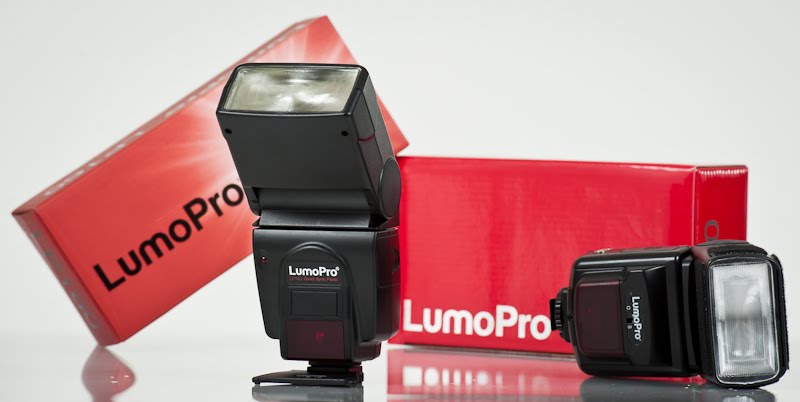
LumoPro LP160 Manual strobist type flash
Great price, Powerful, budget flash , with a lot of built in inputs.
Most strobist use there flashes in manual , so not having TTL is not a issue.
I have been using two(2) older LumoPro LP120 (discontinued now) flashes for a long while now. They are my most used flash on the road/location because of its ease of use and it’s built in sync ability. In fact even if I am using my sb900’s for the Main and fill … I always use the LP120 for the kicker or background. In fact the LP120 is my favorite, most used , "go to" Kicker flash. And it’s a real plus that it’s lightweight too. And low priced (you don’t worry about them all the time, on a location shoot)
Just got the new LumoPro LP160 in prep for this weekends “sold out” Portrait and Lighting Workshop. And I wanted a more powerful, faster recycle flash that will match up better with my four sb900’s that I use.
First thing I noticed about the new LP160 besides the fact that it is slightly larger than the LP120, is that it comes with a 1/8 to PC sync cord and a Pop-on (sb900 style, kinda) wide diffuser, and a cold-shoe stand … all of which the LP 120 did not have. Another thing different from the LP120 is that the battery cover slides completely off (not sure if this is a good thing) I personally like the battery cover of the sb900 better
Below pictured is what is in the box of the LP160 (diffuser and sync cord, manual) ... and, my LP120 carry everywhere Kicker flash set up with the RadioPopper JrX studio attached.

Motorized zoom head from 24mm to 105mm (LP120 you just zoomed it manual). And it does 1/1 thru 1/64 power … also has front and back red Ready lights. Comes with a 2 year warrentee.
A cool feature is you change both power and zoom via it’s own buttons, that are within thumbs distance for easy adjustment of both, at the same time … and the level is shown via lights (nice on night shoots) ..
Also has a digital slave mode that ignores preflashes. Handy when you are shooting in TTL on your main flash.
The Power level of the LP160 vs sb900 is close when I shot it to a background , but I think the sb900 has an edge imho (but, this is great performance for a flash much less than half the cost … note no TTL or CLS on the LP160) …
It also has a wine after the pop ... that I have not heard in modern flashes. Not even the LP120 does this.
Did a 40 shot test, triggering the LP160, LP120, sb900 and Metz 48 … CH continuous shoot at 5 fps with a Niikon D700 16gb Extreme PRO CF, Delkin Low Discharge 2300mAh batteries (which are great by the way, bought at Thomas Distributing) … after the 18th shot when the shot speed slowed down to an even pace but slower (probably 1 fps) … The LP160 fired on every Fourth shot , the sb900 fired on every second shot, Metz 48 every Sixth shot , LP120 every Tenth shot aprox.
Pretty good performance for a $160 flash
http://www.mpex.com/browse.cfm/2,754.html
fyi, the sb900 light pattern looked rounder and slightly larger when both are set to 24mm and the sb900 set to “Even” (Nikon sb900 guys know what I mean) … the sb900 light pattern choices and features needs another blog.
The light pattern on the LP160 is improved vs the LP120 … the LP120 had a hot band of light in the middle of the light pattern … like you can see the light tube. This actually made the LP120 my favorite Kicker / rim light flash. And if I wanted softer more even light I ran a diffuser.
* The LP160 does not have this issue and the pattern is clearly more even.
Bottom line:
"I love this flash!" ..
and it is a Big improvment over the older cheaper LP120 … it will be in my bag along with my sb900’s …
Normally I will shoot TTL on the sb900’s and use the LP160/LP120 in manual for Kicker or background light … the nice thing is I can trigger both using my RadioPopper PX and JrX system together, and am able to mix both TTL and manual … or go strait manual on all my flashes (in studio).
Here is three small things that could have been improved.
1) build in the ability for this flash to be controled by RadioPoppers JrX studio system ... so, we can control the power level via Radio trigger.
2) Whenever I turn on the flash the default is 35mm, 1/1 power ... imho, it should be the "last" settings. or at the very least 24mm, 1/1
3) the Power level should go down to 1/128 ... because this flash is more powerful. :)
Ross Hamamura http://www.rdhphoto.net/

Subscribe to:
Posts (Atom)
